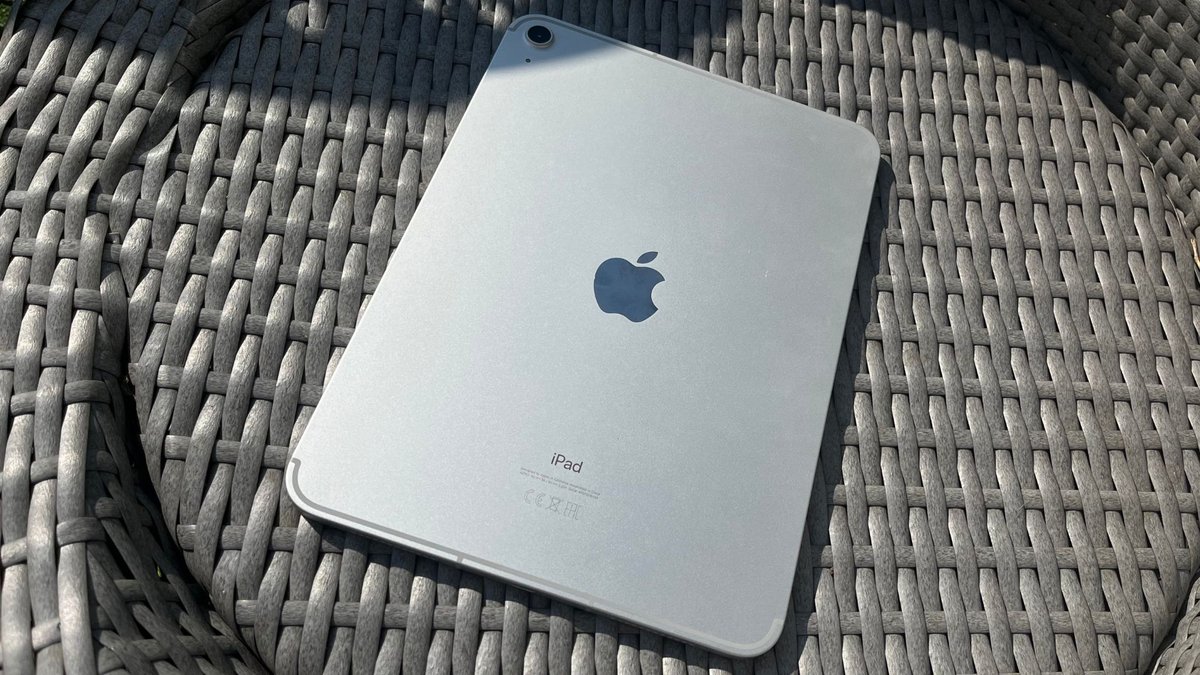
If you're eyeing a new tablet, chances are the Apple iPad 10th Gen has caught your attention. Released with a fresh look and upgraded internals, it promised to bridge the gap between Apple's budget offering and its more premium Air and Pro lines. But how does it really stack up in real-world use, and what does its performance analysis truly reveal for daily tasks, creative work, and entertainment? This comprehensive guide dives deep into the iPad 10th Gen Reviews & Performance Analysis, helping you decide if this redesigned tablet is the right fit for your needs and wallet.
At a Glance: The iPad 10th Gen in a Nutshell
- Price Drop: Originally $449, now a more attractive $349, making it an "Editors' Choice" for affordable tablets.
- Modern Design: Sleek, uniform, flat-edged design, reminiscent of the iPad Air.
- Strong Performance: A14 Bionic chip delivers smooth performance for apps, gaming, and light creative work.
- Great Screen (with caveats): 10.9-inch Liquid Retina display is vibrant indoors, but lacks P3 color, anti-reflective coating, and lamination.
- USB-C & Improved Cameras: Welcomed upgrade from Lightning, and front camera is smartly repositioned for video calls.
- Accessory Ecosystem: Supports 1st-gen Apple Pencil (via adapter) and the new Magic Keyboard Folio, but these add significant cost.
- No Stage Manager: Unlike M-chip iPads, it misses out on advanced multitasking features.
- Target Audience: Ideal for students, casual users, and anyone needing a reliable tablet with long-term software support.
Redefining the "Entry-Level" iPad: A Modern Makeover
For years, the standard iPad clung to its classic design: thick bezels, a physical home button, and a Lightning port. The 10th-generation iPad shatters that mold, embracing the sleek, uniform aesthetic of its more expensive siblings like the iPad mini and Air. This isn't just a cosmetic update; it fundamentally changes the user experience.
You'll immediately notice the flat sides and back, making it more comfortable to hold and giving it a premium feel. The physical Touch ID home button is gone, cleverly integrated into the power key on the top edge—a move that feels intuitive and frees up valuable screen real estate. The bezels are slimmer all around, framing a larger 10.9-inch display that feels far more expansive than previous entry-level models.
Measuring 9.79 x 7.07 x 0.28 inches and weighing just 1.05 pounds (Wi-Fi model), it’s a lightweight companion for your daily carry. The long-awaited switch to USB-C for charging and data transfer is a huge win, bringing consistency across Apple's device lineup and opening up compatibility with a broader range of peripherals. A Smart Connector on the side allows for seamless integration with accessories like the Magic Keyboard Folio.
While the 3.5mm headphone jack is a casualty of the redesign—a common trend across modern devices—the iPad 10th Gen compensates with good stereo speakers positioned on either end. These deliver true stereo sound when held in landscape orientation, perfect for movies or music. And let's not forget the colors: vibrant yellow, pink, blue, and silver options add a touch of personality that stands out from the traditional muted palette.
Diving into the Display: A Visual Experience
The 10.9-inch LED-backlit display is undoubtedly a highlight of the iPad 10th Gen. With a resolution of 2360 x 1640 pixels (264ppi), images and text are sharp and clear. It boasts a peak brightness of 500 nits and supports sRGB color, along with Apple’s True Tone technology, which automatically adjusts the display's white balance to match the ambient light for a more natural viewing experience.
For indoor use—whether you're browsing the web, streaming videos, or tackling productivity tasks—this screen is excellent. Colors pop, and detail is plentiful. However, it's important to manage expectations, especially when comparing it to higher-tier iPads. This display lacks the wider P3 color gamut, an anti-reflective coating, and isn't laminated directly to the outer glass. The non-laminated design creates a slight gap between the display panel and the glass, which can introduce a subtle "tap" sound when using the Apple Pencil and might feel less premium to some. More critically, the absence of an anti-reflective coating means it can struggle quite a bit in bright outdoor conditions or under harsh overhead lighting, making reflections a significant distraction.
So, while it's a significant upgrade from the iPad 9th Gen's smaller, older screen, it's not quite on par with the visual prowess of an iPad Air or Pro, particularly for professional creative work where color accuracy and glare reduction are paramount.
Power Under the Hood: Performance that Impresses
This is where the iPad 10th Gen truly flexes its muscles. Underneath its sleek exterior lies the Apple A14 Bionic chipset, a notable upgrade from the A13 Bionic found in its predecessor. This isn't a chip to scoff at; it powered the iPhone 12 series and continues to offer impressive capabilities.
The A14 Bionic features a six-core CPU and a four-core GPU, ensuring a smooth and responsive experience across the board. Furthermore, it doubles the Neural Engine cores to 16, significantly boosting machine learning tasks, which benefits everything from Siri requests to advanced photo processing and augmented reality applications. Coupled with 4GB of RAM (up from 3GB in the 9th gen), the iPad 10th Gen handles heavy-duty apps, graphically intensive games, and even light video editing with impressive fluidity. You'll notice snappier app launches, smoother multitasking, and generally faster performance compared to previous entry-level iPads.
When it comes to connectivity, the 10th Gen also steps up its game. It supports Wi-Fi 6, offering faster and more reliable wireless performance, though it doesn't extend to the newer Wi-Fi 6E or Wi-Fi 7 standards. Cellular models include 5G capabilities, specifically sub-6GHz, providing speedy mobile internet access where available. Bluetooth 5.2 ensures stable connections with accessories like headphones and keyboards.
However, a critical point for potential buyers is storage. The iPad 10th Gen comes in just two configurations: a 64GB base model ($349) and a 256GB option ($499). The absence of a 128GB tier is a genuine head-scratcher. For many users, 64GB will quickly feel restrictive, especially with modern apps, high-resolution photos, and videos. Stepping up to 256GB is a significant price jump and might be overkill for casual use, yet essential for those who push their devices harder. This storage gap forces many users into a less-than-ideal choice.
Capturing Moments: Cameras Get a Boost
Apple rarely focuses on making its iPads camera powerhouses, but the 10th Gen brings welcome and practical improvements, especially for an increasingly video-call-centric world.
The most significant upgrade is the front-facing 12MP, f/2.4 camera. It's smartly repositioned from the short edge to the long edge of the device. Why does this matter? When you're on a video call in landscape orientation (which is how most people use their iPads for video conferences or FaceTime), the camera is now centered above the display. This results in more natural eye contact and prevents the awkward "looking off to the side" effect common with short-edge cameras. This subtle change significantly enhances the video calling experience, making it far more comfortable and professional-looking.
The rear camera also sees an upgrade, now a 12MP, f/1.8 sensor (up from 8MP on the 9th gen). It's capable of capturing sharp, colorful images in good lighting, benefiting from Smart HDR 3. More impressively, it supports 4K 60 video capture, making it a surprisingly capable tool for quick video projects or recording important moments. While you probably won't be ditching your iPhone for serious photography with the iPad, these cameras are more than adequate for document scanning, casual photos, and high-quality video calls.
Software Savvy and Accessory Costs
The iPad 10th Gen launched with iPadOS 16.1 and has since been updated to iPadOS 17, providing access to Apple's vast and polished ecosystem of apps. iPadOS offers a robust tablet experience, blending familiar iOS gestures with unique multitasking features designed for larger screens.
However, it's worth noting one key limitation: the iPad 10th Gen does not support Stage Manager, Apple's advanced multitasking feature that brings resizable, overlapping windows to the iPad. This feature is reserved for iPads powered by Apple's M-series chips (M1, M2, etc.), positioning the 10th Gen as a slightly less "pro" productivity machine. For most users, especially casual ones or students, the standard Split View and Slide Over multitasking capabilities of iPadOS will be more than sufficient, but power users might feel the absence of Stage Manager.
When it comes to accessories, prepare your wallet. Apple's peripherals are premium-priced, and they can significantly inflate the total cost of ownership. The primary companion is the Magic Keyboard Folio ($249). This innovative two-piece system includes a detachable keyboard and a separate kickstand back cover. The detachable nature is brilliant, allowing you to use just the kickstand for media consumption or drawing. It also features a function row of shortcut keys, a welcome addition for productivity. However, it lacks backlighting and a USB-C pass-through port, which are standard on the more expensive Magic Keyboard for iPad Air/Pro.
For creative endeavors, the iPad 10th Gen supports the 1st-generation Apple Pencil and its newer USB-C variant. Crucially, it does not support the more advanced 2nd-generation Apple Pencil. If you own an original 1st-gen Apple Pencil, you'll need a USB-C to Apple Pencil adapter to charge and pair it with the iPad 10th Gen, as the tablet itself no longer has a Lightning port. This can feel a bit clunky, but it gets the job done. The newer USB-C Apple Pencil ($79) simplifies this, charging directly via the iPad's USB-C port, though it lacks pressure sensitivity.
Finally, the Smart Folio ($79) offers basic screen and back protection but is widely considered overpriced for what it offers and isn't the most durable option out there. Factoring in an iPad, Magic Keyboard Folio, and an Apple Pencil can easily push the total cost close to or even above that of an entry-level MacBook.
Stamina for Your Day: Battery Life Analysis
Apple claims up to 10 hours of battery life for Wi-Fi browsing or video playback and 9 hours for cellular use. In real-world testing, these claims hold up reasonably well. For instance, in video streaming tests at max brightness, the iPad 10th Gen lasted nearly 6 hours—a notable improvement over the 9th-generation model.
For most users, this translates to a full workday's worth of use with typical tasks, leaving approximately 15% battery remaining by evening. This is excellent endurance for a device of its power and screen size. A 20W USB-C charger and cable are included in the box, which is a welcome change given Apple's recent trend of omitting power adapters. A full charge from empty takes a little over two hours, which is standard for tablets of this size.
You can learn more about this versatile device and its capabilities in our comprehensive guide All about iPad Tenth Generation.
Is the iPad 10th Gen Right for You? Making the Decision
The iPad (10th gen) is, without a doubt, an excellent, versatile tablet. At its current $349 price point, it's a formidable contender against virtually any Android tablet, offering superior performance, a robust software ecosystem, and long-term software support. It's truly an "Editors' Choice" for affordable tablets for good reason.
Who is this iPad for?
- Students: Its portability, strong performance for note-taking, research, and media consumption, coupled with excellent battery life, make it an ideal companion for academic life.
- Casual Users: If you primarily use a tablet for browsing, email, streaming, social media, and light gaming, the iPad 10th Gen offers a premium experience without unnecessary frills.
- Families: Its ease of use, access to a vast app library, and robust parental controls make it a great shared device.
- Anyone seeking a reliable tablet: If you value consistent performance, regular software updates for years to come, and access to the best tablet app ecosystem, this iPad delivers.
Who might need to look elsewhere? - True Budget Shoppers: If every dollar counts, and you don't mind the older design and slightly less powerful chip, the older iPad 9th Gen (if still available) might offer better value for a truly entry-level price.
- Power Users & Creative Professionals: Those who need Stage Manager for advanced multitasking, the wider P3 color gamut, anti-reflective coating, or the more advanced features (and charging convenience) of the Apple Pencil 2nd generation should consider the iPad Air or iPad Pro. The cost of the iPad 10th Gen plus its accessories can quickly put it in the price range of these more capable devices, or even entry-level MacBooks.
- Users needing 128GB storage: The lack of this storage tier is a major drawback for many, forcing a choice between a potentially too-small 64GB or an expensive 256GB.
Ultimately, the iPad 10th Gen represents a significant evolution for Apple's entry-level tablet. It modernizes the design, boosts performance, and improves key features like cameras and connectivity. While its accessory costs and the specific display and storage limitations are important considerations, its current price makes it an exceptionally strong recommendation for a broad spectrum of users looking for a capable and enjoyable tablet experience.