Navigating the world of Apple products can feel like deciphering a secret code, especially when you're trying to pin down the best value for a device like the iPad. If you're currently wrestling with questions about iPad 10th Gen pricing, deals, and how to make the smartest buying decision, you've landed in the right spot. We're here to cut through the noise, offering you a definitive, no-nonsense guide to everything you need to know about purchasing Apple's colorful, redesigned entry-level tablet.
This isn't just a list of specs; it's your personal expert consultation, designed to arm you with the knowledge and confidence to snag the perfect iPad 10th Gen without buyer's remorse.
iPad 10th Gen: At a Glance
- Release Date: October 18, 2022
- Processor: A14 Bionic chip
- Display: 10.9-inch Liquid Retina with True Tone (500 nits)
- Design: Modern flat edges, Touch ID in top button
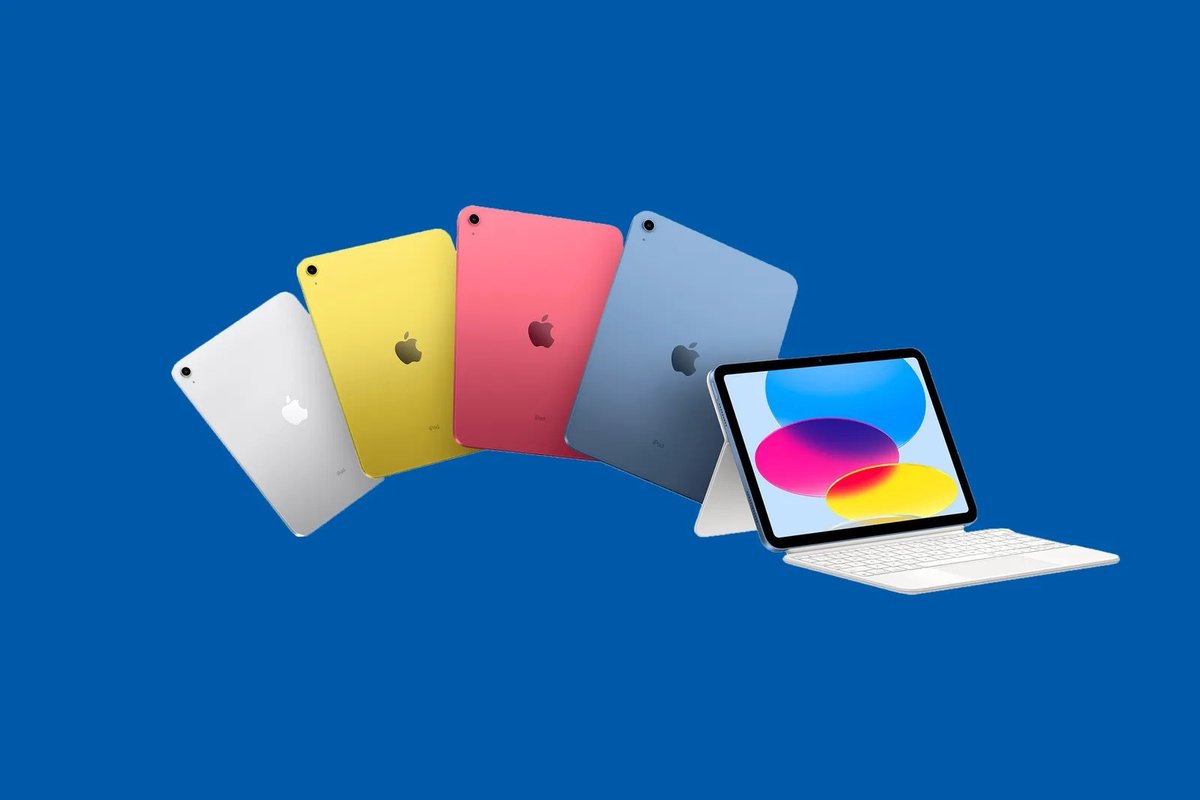
- Colors: Pink, Blue, Yellow, Silver
- Storage Options: 64GB or 256GB
- Connectivity: Wi-Fi Only or Wi-Fi + Cellular
- Apple Pencil Compatibility: Only original Apple Pencil (1st Gen). Requires a USB-C to Apple Pencil Adapter for charging.
- Starting Price (MSRP): $349 (higher than 9th Gen's $329)
- Current Deal Highlight: Walmart has offered the 64GB Wi-Fi model for as low as $269.
Demystifying the iPad 10th Generation: What's Under the Hood?
The iPad 10th Generation isn't just a tablet; it's Apple's fresh take on its most accessible iPad, boasting a significant visual overhaul and performance bump over its predecessor, the 9th Gen. When it debuted in October 2022, it caught eyes with its vibrant new color palette and sleek, modern design.
Gone are the rounded edges and the physical home button of older models. The 10th Gen embraces the flat-sided aesthetic of its more premium siblings, like the iPad Air and Pro. This design choice isn't just cosmetic; it pushes the 10.9-inch Liquid Retina display closer to the edges, giving you more screen real estate for your content. That display, by the way, is a beauty: supporting True Tone for natural color balance and hitting a bright 500 nits. You’ll find Touch ID integrated conveniently into the top button, a familiar and secure way to unlock your device.
Underneath that vibrant screen, the iPad 10th Gen hums along with the Apple A14 Bionic chip. This isn't Apple's very latest silicon, but it's a powerful and efficient processor that comfortably handles everything from demanding games and video editing to everyday browsing and productivity apps. It’s a substantial upgrade from the A13 in the 9th Gen, offering snappier performance and better future-proofing.
Perhaps one of the most talked-about aspects of the 10th Gen is its accessory compatibility – specifically, with the Apple Pencil. Despite its modern USB-C port, this iPad only supports the original Apple Pencil (1st Gen). This means you'll need a separate USB-C to Apple Pencil Adapter to pair and charge it, an admittedly clunky solution. It's a key detail to factor into your buying decision, especially if you plan to use a stylus regularly.
You can pick up the iPad 10th Gen in a range of eye-catching colors: Pink, Blue, Yellow, and the classic Silver. Storage options come in either a sensible 64GB or a more generous 256GB, and you have the choice between Wi-Fi only or Wi-Fi + Cellular models for staying connected on the go. To dive deeper into its full capabilities and how it stacks up against other models, you might want to explore the iPad tenth generation further.
The Sticker Shock: iPad 10th Gen MSRP Breakdown
Before we dive into potential savings, let's establish the baseline: the official manufacturer's suggested retail price (MSRP) for the iPad 10th Generation in the US. This is what you'd typically expect to pay if you walked into an Apple Store or bought directly from Apple.com without any promotions.
Here's the breakdown:
- 64GB (Wi-Fi Only): $349
- 256GB (Wi-Fi Only): $499
- 64GB (Wi-Fi + Cellular): $499
- 256GB (Wi-Fi + Cellular): $649
It's important to note that the iPad 10th Gen carries a slightly higher starting price than its predecessor, the iPad 9th Generation, which launched at $329. While you get a modernized design and improved performance for that extra cost, it’s a factor worth considering if budget is your absolute top priority. This price increase means hunting for deals is even more crucial for value-conscious buyers.
The Hunt for Savings: Current iPad 10th Gen Deals
While the official prices are what they are, the real journalist in us knows that savvy shoppers rarely pay full freight. The good news? The iPad 10th Gen has been on the market for a while, making it a prime candidate for discounts, especially around major shopping holidays or retailer-specific promotions.
Here’s a snapshot of where you might find current deals and what to expect:
- Walmart: The Unexpected Frontrunner
Walmart has consistently offered some of the most aggressive pricing on the iPad 10th Gen. We've seen the base model (64GB Wi-Fi) drop to an impressive $269, which is a significant $80 off its MSRP. However, these deals are often specific to certain colors or configurations, and stock can be volatile. At the time of this writing, for example, the $269 deal was available but only for the silver color. Keep a close eye on Walmart's electronics section, both online and in-store, as their stock and prices can fluctuate rapidly. - Best Buy: Refurbished Opportunities
While Best Buy might not have new 10th-gen iPads consistently in stock, they are a solid go-to for refurbished models. Prices for refurbished units can start around $285, offering another avenue for savings. Best Buy's Geek Squad Certified Refurbished program typically includes a warranty, providing a layer of confidence you might not get from other refurbished sellers. If you’re comfortable with a pre-owned device, this can be an excellent way to save. - Target: Check Before You Click
Target's stock levels and pricing for the iPad 10th Gen can be quite volatile. They often run their own promotions, especially during holiday periods, but availability can be hit-or-miss. Our advice: if you see a good deal at Target, verify the price and stock immediately before ordering. Online stock checks are a must. - Amazon: Currently Dry
Surprisingly, Amazon doesn't currently have the 10th-gen iPad in stock for new purchases. This could change at any moment, so it's always worth checking back. Historically, Amazon can be a good source for competitive pricing, but for now, other retailers seem to be leading the charge.
Pro Tip for Deal Hunters: Price matching policies can be your friend. Many retailers will match a competitor's advertised price, especially from major chains like Walmart or Target. Always ask if price matching is available before you buy, but be ready with proof of the lower advertised price.
Refurbished vs. New: A Smart Path to Savings?
The mention of Best Buy's refurbished options brings up an important question for budget-conscious buyers: should you consider a refurbished iPad? It's a valid path that often leads to substantial savings, but it's not without its nuances.
The Pros of Refurbished:
- Significant Savings: This is the obvious one. You can often get a higher-tier model (more storage, cellular connectivity) for the price of a base-model new unit, or simply save a chunk of change on the configuration you want.
- Environmentally Friendly: Buying refurbished extends the life of electronics, reducing e-waste.
- Quality Assurance (from reputable sellers): Reputable retailers like Best Buy (or Apple itself, though they may not always carry the 10th Gen as "certified refurbished" directly) put refurbished devices through rigorous testing, repairs, and cleaning. They often come with warranties, mitigating risk.
The Cons of Refurbished: - Cosmetic Imperfections: While often "like new," some refurbished devices might have minor cosmetic flaws (scratches, scuffs) that don't affect performance.
- Battery Life: While batteries are usually tested and replaced if below a certain threshold by certified refurbishers, a refurbished device's battery might not be exactly 100% capacity from day one, unlike a brand-new one.
- Limited Stock/Configuration: You might not find the exact color, storage, or connectivity option you want at a given time. Flexibility is key.
- Warranty Differences: While certified refurbished usually comes with a warranty, it might be shorter than a new product's warranty. Always check the terms.
Our Take: For the iPad 10th Gen, considering a reputable refurbished option, especially from a retailer like Best Buy, is absolutely a smart move. The savings can be considerable, and the risk is low when buying from trusted sources. Just be clear on the return policy and warranty before committing.
Your Personalized Buying Guide: Making the Right Choice
Now that we've covered the specs and the prices, let's talk about you. Which iPad 10th Gen configuration makes the most sense for your life?
1. Storage Decisions: 64GB vs. 256GB
This is often the first and most agonizing choice.
- 64GB: The Everyday User's Pick
- Who it's for: If your iPad is primarily for browsing the web, checking email, streaming video (Netflix, YouTube), social media, light gaming, and basic productivity (notes, documents stored in the cloud).
- Considerations: Apps themselves are getting larger. While cloud storage (iCloud, Google Drive, Dropbox) can offload photos and documents, large game installations or downloading movies for offline viewing will quickly eat into 64GB. If you foresee yourself frequently downloading media or storing many large files locally, 64GB might feel cramped over time.
- Verdict: Sufficient for casual use, but requires mindful storage management. It’s the cheapest option, making those deals even sweeter.
- 256GB: The Power User & Future-Proofer
- Who it's for: If you plan to download a lot of games, store a vast photo/video library directly on the device, work with large creative files (video editing, graphic design), or simply don't want to think about storage management.
- Considerations: This significantly increases the price, but it offers peace of mind. You won't be constantly deleting apps or offloading files.
- Verdict: The safer bet for longevity and heavy use. If you can stretch your budget, this is often the recommended choice to avoid future frustration.
2. Connectivity Choices: Wi-Fi Only vs. Wi-Fi + Cellular
Do you need to be connected everywhere, or is Wi-Fi sufficient?
- Wi-Fi Only: The Homebody's Companion
- Who it's for: Most people. If you primarily use your iPad at home, school, work, or in places with readily available Wi-Fi. You can always tether to your smartphone's hotspot when on the go, though this drains your phone's battery and uses its data plan.
- Considerations: This is the more affordable option and avoids an extra monthly cellular bill.
- Verdict: The best value for most users.
- Wi-Fi + Cellular: The Untethered Explorer
- Who it's for: Professionals who need constant connectivity for work, frequent travelers, or anyone who doesn't want to rely on Wi-Fi hotspots or their phone's battery for internet access.
- Considerations: Costs an additional $150 upfront, plus a monthly cellular data plan (which can vary widely by carrier and data allowance). It offers true freedom from Wi-Fi, with built-in GPS capabilities (useful for navigation apps without a phone).
- Verdict: A premium feature for those who genuinely need it. Don't pay for it if you'll rarely use it.
3. Accessories You'll Need (or Want)
The iPad 10th Gen is great on its own, but accessories unlock its full potential.
- Apple Pencil (1st Gen): The Creative's Essential
- Why: For note-taking, drawing, marking up documents. It's precise and responsive.
- The Catch: As mentioned, it only supports the 1st Gen Apple Pencil. This means you'll need a USB-C to Apple Pencil Adapter to pair and charge it with your 10th Gen iPad. The adapter often costs an additional $9 (if not included with a new Pencil purchased after the 10th Gen's release).
- Cost: Around $99 for the Pencil, plus the adapter.
- Verdict: Essential for students, artists, or anyone who values handwritten input. Just be aware of the charging quirk.
- Magic Keyboard Folio: The Productivity Powerhouse
- Why: Transforms your iPad into a laptop-like experience with a comfortable keyboard and trackpad. Great for typing long documents or emails.
- Cost: Around $249 (significant investment).
- Alternatives: Third-party Bluetooth keyboards and cases can offer similar functionality for much less, though they might lack the seamless integration and quality of Apple's first-party options.
- Verdict: Worth it if the iPad is replacing a laptop for productivity tasks.
- Smart Folio: The Sleek Protector
- Why: A lightweight case that protects your iPad and acts as a stand for viewing.
- Cost: Around $79.
- Verdict: A good basic protective cover. Many cheaper third-party options exist.
4. Colors & Aesthetics
While purely subjective, the 10th Gen’s vibrant colors are a selling point. Pink, Blue, Yellow, and Silver offer distinct personalities. If you’re buying on a deep discount, you might be limited to the colors in stock (like Walmart’s silver-only deal), so consider how much color matters to you versus savings.
5. When to Buy: Timing Your Purchase
Apple product cycles are fairly predictable, but deals on older models are less so.
- Best Times for Deals: Major shopping holidays like Black Friday, Cyber Monday, Prime Day (Amazon), and often back-to-school sales in late summer. Retailers often clear out stock before new models are announced.
- New Models: Apple typically refreshes its iPads annually or biennially. The 10th Gen was released in late 2022. While there's always a chance of a new model being announced, it's rarely worth indefinitely waiting if you need a device now, especially with current discounts. The sweet spot for deals is often 12-18 months after launch.
6. Who is the iPad 10th Gen For?
This iPad sits in an interesting position, offering a modern design at a more accessible price point than the Air or Pro models, yet at a higher entry point than the 9th Gen.
- Students: Excellent for notes, research, and light productivity.
- Casual Users: Perfect for entertainment, web browsing, and social media.
- Families: A versatile shared device for games, learning, and video calls.
- Those Upgrading from an Old Model: If you're coming from an iPad that's several generations old, the 10th Gen will feel like a massive leap in performance and design.
- Anyone Who Loves Color: The vibrant palette is genuinely appealing.
- Not for: Professionals requiring the absolute latest performance, or those who already own an iPad Air 4/5 or iPad Pro, as the performance jump might not justify the cost.
Addressing Common Questions & Misconceptions
Let's clear up some common thoughts and potential pitfalls related to the iPad 10th Gen.
"Is the iPad 10th Gen worth it at its MSRP?"
At its full MSRP of $349, it's a tougher sell given the strong competition (and sometimes even discounts) from the iPad Air and the still-available iPad 9th Gen. However, with the kind of deals we're seeing (e.g., $269 at Walmart), it becomes an excellent value proposition. At a discounted price, you're getting a modern design, a great screen, and solid performance for less than its official entry price, making it highly "worth it."
"Why is the Apple Pencil 1st Gen compatibility so strange?"
This is a common point of confusion. The iPad 10th Gen has a USB-C port, but the 1st Gen Apple Pencil charges via a Lightning port. Apple's solution is the USB-C to Apple Pencil Adapter, which creates a somewhat clunky dongle situation for pairing and charging. It's likely a decision to keep costs down compared to integrating the magnetic charging needed for the Apple Pencil 2, which would have pushed the 10th Gen into a higher price bracket. While inconvenient, it works.
"Should I wait for a new iPad model?"
Unless you absolutely need a tablet right now, there's always a new Apple product on the horizon. However, waiting indefinitely means missing out on current functionality and potentially good deals. The iPad 10th Gen is a robust device with years of software support ahead. If a deal comes along that meets your budget and needs, it's often better to seize it than to endlessly wait for the next iteration, which will likely come at full price initially.
"How does it compare to the iPad 9th Gen?"
The iPad 10th Gen offers a significant design refresh (full-screen look, no home button, USB-C) and a faster A14 Bionic chip. The 9th Gen, while cheaper, retains the older design, Lightning port, and A13 chip. If you prioritize modern aesthetics and a performance boost, the 10th Gen (especially at a discount) is the better choice. If budget is paramount and you don't mind the classic design, the 9th Gen is still a capable device.
Your Next Steps: Sealing the Deal on Your iPad 10th Gen
You're now armed with the insider knowledge to confidently navigate the market for an iPad 10th Gen. Here’s a quick action plan:
- Define Your Needs: Revisit the storage and connectivity sections. Be honest about how you'll use the iPad. Don't overpay for features you won't use, but don't under-spec yourself into frustration either.
- Set Your Budget: Determine your absolute maximum spend, including any accessories like an Apple Pencil or keyboard.
- Check Current Deals (Daily!): Start with Walmart and Best Buy (for refurbished). Check Target too, but be mindful of their stock volatility. Amazon is always worth a quick look, just in case. Prices can change rapidly, so act when you see a good deal that matches your needs.
- Consider Refurbished: If savings are a major driver, don't shy away from reputable refurbished options like those from Best Buy. Ensure you understand the warranty and return policy.
- Factor in Accessories: If you need an Apple Pencil or keyboard, remember to budget for them and understand their specific compatibility quirks with the 10th Gen.
The iPad 10th Gen is a fantastic tablet, especially when you find it at the right price. With its modern design, vibrant display, and capable performance, it’s ready to be your companion for productivity, creativity, and entertainment. Happy hunting!